Powered by Smartsupp Indication Instruments, Author at Indication Instruments Ltd.
EV Instrument Clusters: How They Differ from ICE Vehicle Clusters?

EV Instrument Clusters: How They Differ from ICE Vehicle Clusters?

EV Instrument Clusters: How They Differ from ICE Vehicle Clusters?

A few months ago, an OEM customer called me to ask a question I have been hearing more and more often: “We are moving one of our platforms to electric. Can we just use the same cluster we’ve been using for the past eight years?”

The short answer is no. The longer answer is what I want to walk you through in this post.

I have spent over two decades working on vehicle instrumentation — clusters, sensors, driver information systems. The transition from ICE to EV is, without question, the most significant shift I have seen in how we think about what a cluster needs to do. It is not just a new product requirement. It is a fundamentally different design brief.

So whether you are an OEM engineer, a procurement lead, or a fellow supplier trying to figure out where your product needs to go — let me break it down the way I would over a whiteboard session.

“The shift from ICE to EV is not just a new product requirement. It is a fundamentally different design brief.”

First — What Exactly Is an Instrument Cluster?

I always start here because it grounds the conversation. An instrument cluster sometimes called a driver information panel or gauge cluster is the primary interface between the vehicle and its driver. Its job is to surface critical data in real time: how fast you are going, whether the engine or motor is running well, how much energy you have left, and whether anything is wrong.

Traditionally, clusters combined physical analog needles with a small LCD segment display. If you want to understand that earlier transition in detail, our post on Analog vs Digital Instrument Clusters covers it well. But the leap from a digital ICE cluster to a proper EV cluster is an even bigger jump, because in an EV, the engine is gone, the fuel tank is gone, and with them, many of the fundamental gauges that defined dashboards for a hundred years.

What an ICE Cluster Is Actually Monitoring?

Let me give you a clear picture of the ICE cluster’s world. Its entire job is monitoring a combustion engine and its consumables. The core gauges almost never change, regardless of whether the vehicle is a scooter or a heavy truck:

  • Tachometer (RPM) — how hard the engine is working
  • Speedometer — vehicle speed
  • Fuel level gauge — how much is left in the tank
  • Coolant temperature — is the engine overheating?
  • Oil pressure warning — is lubrication failing?
  • Battery / charging indicator — for the 12V ancillary system

Most of that data comes in via analogue signals or, in modern vehicles, over J1939 or CAN 2.0 protocols. The cluster reads those signals and moves the pointer motors or lights up the segments. It is a mature, well-understood system. The supply chain is deep. Validation is well-documented.

That is precisely what makes the question “can we just reuse the same cluster for EV?” so understandable and so problematic.

What an EV Cluster Needs to Do? — and Why It Is So Different?

When a vehicle runs on electricity, the entire monitoring logic changes. There is no combustion cycle to watch. Instead, your cluster needs to simultaneously manage information from a battery pack, an electric motor, a thermal management system, a regenerative braking system, and a charging management module.

Here is what the core EV gauge set looks like:

  • State of Charge (SoC) — the EV fuel gauge. Expressed as a percentage of remaining battery capacity
  • Estimated Range — calculated dynamically using SoC, driving style, ambient temperature, and terrain
  • Power Flow Indicator — shows whether energy is going battery-to-motor (discharging) or motor-to-battery (regenerating)
  • Regenerative Braking Meter — indicates how much energy is being recovered during deceleration
  • Motor Temperature — replaces coolant temp; the motor and inverter generate heat that must be tracked
  • Battery Thermal Status — shows the temperature of the battery pack itself — multi-zone in commercial EVs
  • Charging Status & Rate — when plugged in: charge level, charging rate in kW, estimated time to full

And then there are the warning lamps. Where an ICE cluster might carry 15 to 20 Malfunction Indicator Lamps — your classic Check Engine, Oil Pressure, Battery Warning — an EV cluster can have 30 to 50 or more distinct fault categories.

Battery Management System faults, inverter overtemperature, charging port errors, regen braking limits — all of these need to reach the driver clearly and safely. Our post on how Driver Information Systems improve vehicle safety goes into the design philosophy behind managing this level of data without overwhelming the driver.

The Full Picture: ICE vs EV Clusters comparison

I find this kind of direct comparison table genuinely useful when I am in a specification meeting with OEM customers. Here is what changes, parameter by parameter:

ParameterICE Instrument ClusterEV Instrument Cluster
Core GaugesRPM tachometer, Fuel level, Oil pressure, Coolant temperatureState of Charge (SoC), Range estimator, Power flow, Regen braking indicator
Power Architecture12V lead-acid battery charged by alternatorHigh-voltage pack (100V–800V+) with DC-DC converter stepping down to 12V
Communication ProtocolCAN 2.0 (up to 1 Mbps) or J1939 for CVsCAN 2.0 or CAN FD (up to 8 Mbps)
Display TechnologyAnalog needles + small LCD segment displayAnalog needled + colour TFT mostly or fully digital
Thermal MonitoringSingle coolant temperature gaugeMulti-zone: battery pack, motor winding, inverter, DC-DC converter
Energy DataFuel level (%) + estimated km rangeSoC (%), real-time kWh/km consumption, regenerated energy recovered
Software DependencyMostly Embedded C basedEmbedded-C, Embedded OS (Linux/android/QNX), RTOS
Warning Indicators~40-50 MIL lamps (Check Engine, Oil, Battery, etc.)50+ including BMS fault, charge error, motor overheat, regen limit
CustomisationLimited changes/ modification through Softwaremultiple drive-mode themes via OTA updates in fully digital clusters
Form Factor TrendSeparate cluster + separate infotainment head unitIntegrated digital cockpit — single wide screen spans cluster and IVI
Indian Market MaturityMature; deep supply chain; well-understood validationEmerging; fast-growing under FAME II, PLI Scheme, BS6 Phase 2 push

Table: Indication Instruments Ltd. internal product specification matrix, April 2026

The Communication Protocol Shift Nobody Talks About Enough

One of the things I find myself explaining most often is the data bandwidth problem.

ICE vehicles largely run on CAN 2.0 and J1939/a>. These are battle-tested protocols, designed in the late 1980s and 1990s, that top out at 1 Mbps. That is plenty for an ICE drivetrain with a handful of ECUs.

An EV powertrain generates vastly more data — individual cell voltages across a 96-cell pack, thermal zone readings, motor torque maps, regen events, BMS state transitions. You cannot push all of that through a CAN 2.0 bus reliably. So modern EVs are moving to:

  • CAN FD (Flexible Data-Rate) — up to 8 Mbps; backward-compatible at the hardware level with CAN 2.0
  • Automotive Ethernet (100BASE-T1) — up to 100 Mbps; used for display rendering, OTA firmware updates, and camera feeds
  • LIN Bus — still used for lower-priority accessories like ambient lighting and HVAC control

This is not just a spec-sheet change. It requires a different hardware architecture inside the cluster, different firmware, and a significantly more demanding validation process. When we are spec-ing an EV cluster, protocol compatibility is one of the first things we nail down with the customer.

Engineering Note: If you are in early platform architecture discussions, insist on CAN FD support as a baseline for any EV cluster. The incremental cost over CAN 2.0 hardware is small at the component level; the cost of retrofitting the architecture mid-program is not.

Software-Defined Clusters: The Shift That Changes Everything

This is the part that I think surprises people the most when they move from ICE to EV cluster procurement for the first time.

An ICE cluster is, at its core, hardware-defined. The layout, the gauge ranges, the warning logic, all of that is fixed at the tooling stage. If the OEM wants to add a new MIL or change the speedometer range, they need a new cluster. That is just the reality.

An EV cluster runs an embedded operating system. It renders the display through a GPU. It can receive firmware updates over the air after the vehicle leaves the factory. That means:

  • Drive mode themes: Eco, Normal, Sport, can show completely different colour schemes and data layouts
  • New warning indicators can be deployed via OTA without touching the hardware
  • The same physical cluster unit can be reprogrammed for different vehicle derivatives on the same platform
  • ADAS alerts: lane departure warnings, forward collision alerts, can be rendered directly within the cluster view

For OEMs, this is genuinely transformative. You get a longer product life out of the same hardware investment, and you can iterate the user experience post-launch. But it also means your cluster supplier needs embedded software capability, not just hardware manufacturing quality. That is a non-trivial shift in how you evaluate a supplier.

“In EV cluster procurement, your supplier’s embedded software capability is now as important as their hardware manufacturing quality.”

What This Means for Commercial Vehicles and Fleets in India?

India’s EV transition is happening fastest where it matters most commercially: two-wheelers and commercial vehicles. And both of those segments are close to my heart, because they are the segments where cluster design decisions have direct, real-world safety consequences.

Electric buses, three-wheelers, and light commercial EVs have cluster requirements that extend well beyond what a personal EV needs. Our post on instrument clusters for buses and panels covers some of the context here. For EV commercial vehicles specifically, you also need:

  • Integration with AIS 140-compliant fleet telematics — which is mandatory for commercial vehicles in India
  • Dynamic range estimation that accounts for payload weight, road gradient, air conditioning load, and driver behaviour
  • Multi-zone battery monitoring for large-format pack configurations
  • Displays rated for vibration, dust, and wide ambient temperature swings — essential for last-mile delivery in Indian conditions

Fleet operators who have been running ICE vehicles for twenty years will find the procurement criteria for EV clusters quite different. I would encourage you to start those conversations early ideally at platform concept stage, not after the vehicle architecture is locked.

Where Indication Instruments Is Heading on EV

I will be transparent about where we are and where we are going. At Indication Instruments, we have been manufacturing instrument clusters and sensors and switches for ICE platforms for decades. We understand the manufacturing quality, the validation rigour, and the OEM relationship model that this industry demands.

Our engineering investments are now firmly pointed at EV-ready architectures. Specifically:

  • CAN FD-compatible cluster platforms for 2-wheeler, 3-wheeler, and light commercial EV applications
  • SoC display modules with BMS integration support — compatible with the major battery management systems used in the Indian market
  • Multi-zone thermal sensor input handling for battery pack monitoring
  • Configurable warning lamp logic covering EV-specific fault categories, including BMS, motor controller, and inverter faults

If you are planning an EV platform and want to talk through cluster requirements before the RFQ stage, I would genuinely welcome that conversation. You can reach us through our contact page, and I am also happy to have a direct technical discussion. That is the kind of engagement that I think leads to better products for everyone.

Final Thought

The instrument cluster has always been the most human part of the vehicle, the one piece of technology that speaks directly to the driver every single time they sit behind the wheel. In an EV, that job gets harder and more important simultaneously.

Getting it right means understanding not just the new gauges and the new protocols, but the new philosophy: a display that must handle more data, more complexity, and more software sophistication, while still being clear, readable, and trusted at a glance.

That is the challenge we are working on at Indication Instruments. I hope this post helps you think through it for your platform too.

Frequently Asked Questions

Q1. Can an existing ICE instrument cluster be retrofitted into an EV platform?

Technically possible — practically inadvisable. An ICE cluster is calibrated to interpret analogue signals and specific CAN messages from an ICE ECU. An EV powertrain sends entirely different messages: SoC data from the BMS, torque data from the motor controller, and regeneration status — none of which the ICE cluster was built to read.

You can get around this with a CAN gateway module that translates EV data into ICE-equivalent signals — but what you end up with is a cluster that cannot show range, cannot show thermal status, and cannot surface EV-specific faults. For a prototype or a proof of concept, maybe. For a production vehicle, you owe your customers better than that.

Q2. What is State of Charge (SoC) and how does the cluster actually display it?

SoC is the remaining energy in the battery pack expressed as a percentage of its total capacity — the direct equivalent of a fuel gauge. The Battery Management System (BMS) calculates it using Coulomb counting (tracking current flowing in and out of the pack), Open Circuit Voltage measurement, and temperature-corrected capacity modelling.

The BMS sends the SoC value as a CAN message to the instrument cluster, which then renders it as a percentage bar, a segmented arc, or a dial depending on the OEM’s UX design. One nuance worth flagging: SoC accuracy degrades as the battery ages, which is why thoughtful EV clusters also expose State of Health (SoH) as a separate parameter for fleet management use cases.

Q3. How does an EV cluster differ between a 2-wheeler and a commercial vehicle?

Significantly. A 2-wheeler EV cluster is compact, designed around a single LFP or NMC cell pack with a relatively simple BMS. The display priorities are SoC, speed, and a handful of warning lamps. Form factor, glare resistance in Indian sunlight, and vibration tolerance are the critical design parameters.

A commercial EV cluster, for an electric bus or a three-tonne truck is a different beast. Multi-pack battery architectures, AIS 140 fleet telematics integration, regen efficiency data, complex fault diagnostics across dozens of ECUs, and a display that must remain readable in a cab environment. The data bandwidth, display size, and software complexity are all in a different league.

Related: Instrument Clusters for Buses and Panels — Why They Matter

Q4. What communication protocols should I mandate when sourcing an EV cluster?

My baseline recommendation: specify CAN FD (ISO 11898-2) support as a non-negotiable. For 2-wheeler and passenger EVs, also ask about 100BASE-T1 Ethernet support for display rendering and OTA connectivity. LIN Bus is still useful for ancillary inputs.

For commercial vehicles on Indian roads: buses, trucks, last-mile delivery vehicles, also confirm J1939 compatibility. Many fleet telematics platforms and AIS 140-compliant systems still communicate over J1939. If your cluster cannot speak J1939, you will have integration problems downstream.

More on protocols: J1939 vs Analog Instruments — Key Differences

Q5. Are there Indian regulations specific to EV instrument cluster design?

Yes and this is an area where I see OEMs caught off guard more than anywhere else. The key frameworks to know:

  1. AIS 138 / AIS 049 — EV safety requirements including mandatory warning systems visible to the driver
  2. AIS 140 — mandatory GPS/GPRS telematics for commercial vehicles; must integrate with the cluster or gateway ECU
  3. CMVR Schedule X / XV — minimum display requirements for speed, odometer, and warning indicators across all vehicle categories including EVs

Always validate against the latest AIS revisions from ARAI. The EV-specific standards are still evolving, and what was current eighteen months ago may not reflect current homologation requirements.

Have questions about EV cluster architecture for your next platform? I welcome direct technical conversations. Reach out through indicationinstruments.com/contact-us/ — our engineering team is ready to help.

Related Posts from the Indication Instruments Blog

Multi-Function Digital Displays for Construction and Agricultural Equipment: Key Capabilities

Multi-Function Digital Displays for Construction and Agricultural Equipment: Key Capabilities

Multi-Function Digital Displays for Construction and Agricultural Equipment

Introduction: One Screen, A Machine’s Worth of Information

I attended an agricultural machinery exhibition a few years back where a single combine harvester had its cab redesigned around a large format multifunction display. The machine previously used eleven separate analog gauges and three toggle-monitored warning lights. The new setup consolidated everything into one configurable screen. A technician standing next to me, who had been servicing these machines for over two decades, looked at it for a moment and said: ‘That is the first time I have understood what a combine is actually doing just by looking at the dash.’

That observation has stayed with me because it captures what multifunction digital displays are supposed to accomplish. Not to add complexity, but to reduce it. Not to impress with features, but to give an operator a clear, prioritized view of a complex machine’s operational state.

The global agricultural equipment market is projected to reach USD 230 billion by 2027, according to Grand View Research. The construction equipment segment sits alongside it at approximately USD 215 billion. Both industries are in the middle of a significant digital instrumentation transition, driven by telematics integration requirements, emissions compliance monitoring, and the growing penetration of precision agriculture and job site management platforms. Multifunction digital displays are at the center of that transition.

This post examines what multifunction displays actually need to do in these applications, how construction and agricultural requirements differ from each other, and what technical specifications drive sound procurement decisions.

What Multi-Function Actually Means in Practice

The term multifunction gets applied loosely across the display market. Before any specification conversation, it is worth being precise about what the function set actually needs to cover.

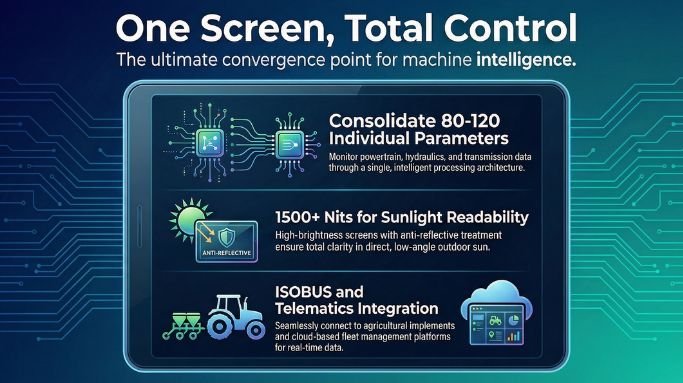
Parameter consolidation: A multifunction display in a combine harvester or wheel loader needs to handle sensor inputs from the powertrain, hydraulic system, transmission, and cabin environment simultaneously. In a modern combine, that means 80 to 120 individual parameters are potentially displayable. The display needs the processing architecture to read all of them and the screen real estate to present the relevant ones intelligently.

Multi-network CAN capability: Agricultural and construction equipment routinely runs multiple CAN networks. The engine and powertrain typically operate on one network. Body and implement systems operate on another. An ISOBUS-connected implement adds a third. A display that can only read one CAN network will miss critical operational data in most professional applications.

Configurable display zones: Operators in different roles configure their information differently. A harvesting operator prioritizes grain yield, moisture content, and header height. A transport driver on the same machine prioritizes road speed and fuel level. A good multifunction display allows operator-defined configurations that switch contextually.

Alert prioritization and alarm management: The most important function of any multifunction display is making sure critical alerts are not lost in a sea of normal operating data. SAE J1939 defines severity classifications for diagnostic trouble codes. The display must respect those classifications and present critical alerts with appropriate urgency without rendering normal parameter displays unusable.

Indication Instruments’ range of

multifunction digital displays is engineered to handle these multi-network, multi-parameter requirements in the demanding environments that construction and agricultural equipment imposes.

Construction Equipment: What the Application Demands

Construction equipment encompasses a wide range of machine types, each with its own display requirements. Excavators, wheel loaders, motor graders, compactors, and articulated haul trucks share a common theme: they operate in outdoor environments with significant vibration, dust exposure, and variable lighting, and they are increasingly expected to feed data into job site management platforms.

The most consistent display requirement I hear from construction fleet operators is sunlight readability. A display that performs perfectly in a controlled environment becomes functionally useless when the machine is operating with the afternoon sun at a low angle through the cab windscreen. Minimum 1500 nit display brightness with anti-reflective cover glass treatment is a practical floor for serious outdoor construction applications.

Telematics integration for machine utilization reporting is the second most consistent requirement. Equipment rental companies and large contractors increasingly run centralized asset management platforms that need real time data on machine hours, fuel consumption, fault status, and GPS position. The multifunction display in the cab is the node through which telematics data becomes visible to the operator, and the TCU integration behind the display is what feeds the asset management platform. Specifying a display that supports TCU integration from the start avoids costly retrofit work later.

According to McKinsey, digital fleet management for construction equipment reduces equipment idle time by 15 to 25 percent. At the utilization rates and fuel consumption levels of large construction machinery, that reduction translates to meaningful cost recovery.

Agricultural Equipment: The ISOBUS Requirement

Agricultural equipment has a specific integration requirement that separates it from most other off-highway vehicle categories: ISOBUS. Defined by ISO 11783 and built on J1939 architecture, ISOBUS enables the tractor display to communicate directly with attached implements, showing implement-specific parameters and allowing operator control of implement functions from the cab display.

In practical terms, this means a seed drill attached to a tractor communicates its section control status, seed rate, blockage alarms, and actual application rate directly to the tractor’s multifunction display. A fertilizer spreader sends its application rate and GPS section status. A baler sends bale count and chamber pressure. Without ISOBUS capability in the display, all of this information is either inaccessible or requires separate implement-mounted displays, which fragment the operator’s attention and complicate the cabin ergonomics.

Precision agriculture is accelerating the data demands on these displays. Variable rate application systems, GPS guidance overlays, yield mapping integration, and field management platform connectivity are all capabilities that professional arable and livestock farmers now expect as standard in premium equipment. The multifunction display is the convergence point for all of it.

The global precision agriculture market is projected to reach USD 14.5 billion by 2027, according to MarketsandMarkets. That growth is being driven by the integration of GPS, sensor, and display technology that makes variable rate application and yield monitoring operationally practical. The display platform is the linchpin of that integration.

Key Capabilities by Equipment Type: A Comparison

The table below outlines the core multifunction display capabilities required across construction, agricultural, and mining equipment categories. Requirements vary more than product specifications typically acknowledge.

CapabilityConstruction EquipmentAgricultural EquipmentMining Equipment
Primary ProtocolJ1939, CANopenISOBUS (ISO 11783), J1939J1939, CANopen, proprietary OEM
Minimum Display Brightness1500 nits (outdoor operations)1500 nits (field operations)2000 nits (direct sun exposure)
Multi-Network CAN2 networks minimum3 networks (tractor + implement + GPS)3 to 4 networks standard
ISOBUS Task ControllerRarely requiredMandatory for implement controlNot applicable
Telematics IntegrationJob site management platformField management system, AgTech platformMine management and dispatch system
Data LoggingMachine hours, fuel, fault eventsYield data, application rates, GPS tracksPayload cycles, tyre pressure, downtime events
Alarm Management Levels3 tier (advisory, caution, critical)3 tier plus implement-specific warnings4 tier including safety interlock states
Operating TemperatureMinus 20 to plus 70 degrees CMinus 40 to plus 70 degrees CMinus 40 to plus 85 degrees C
GPS Overlay SupportJob site mapping (optional)Field boundary and guidance (standard)Haul route and pit mapping (required)

Technical Specifications That Drive Procurement Decisions

Screen size gets a lot of attention in display procurement conversations. It matters, but it is rarely the most important specification. The criteria that separate a display that works in an agricultural cab from one that fails at month six in the same application are environmental tolerance, protocol depth, and processing architecture.

Processing capacity: Multifunction displays need sufficient processing headroom to handle CAN message parsing, display rendering, alert processing, GPS data management, and telematics communication simultaneously. Displays that perform adequately in bench testing can suffer rendering latency or missed alarms when all subsystems are active simultaneously in a field environment. Asking for demonstrated performance under full load, not peak theoretical specifications, is the right evaluation approach.

Memory and data logging: Precision agriculture and construction telematics both depend on reliable local data logging when cellular connectivity is unavailable. A display that loses operational data because it lacks sufficient onboard storage defeats a significant part of its purpose in field applications. Ask for specific local storage capacity and logging interval specifications.

Connectivity options: Bluetooth pairing for operator configuration via tablet, Wi-Fi for job site hotspot connectivity, and cellular modem integration for real time fleet platform communication are all relevant connectivity requirements in modern equipment. Not every application needs all three, but understanding which connectivity modes the display supports natively versus requiring external hardware saves integration complexity.

Exploring the full product range at Indication Instruments is a practical starting point for construction and agricultural equipment programs where multifunction display specifications need to be matched to specific operational requirements.

Where This Technology Is Heading

Two developments are shaping the next generation of multifunction display deployments in construction and agricultural equipment.

Autonomous and semi-autonomous equipment is arriving in both sectors. Autonomous haul trucks are already operating in large surface mining sites. Autonomous tractors are in commercial deployment with multiple manufacturers. The instrument cluster in these machines shifts from an operator interface to a remote supervision and intervention interface. The display architecture, processing requirements, and connectivity demands of autonomous operation are substantially different from conventional operator-present applications. Display platforms selected for the next equipment generation need to be evaluated with that transition in mind.

Cloud integration for real time job site and field management is becoming a baseline expectation rather than a premium feature. Contractors and large farming operations increasingly expect live machine data in browser-based management platforms without manual data transfer. The multifunction display is the on-machine endpoint of that data pipeline. Its ability to connect reliably to cloud platforms via cellular or site Wi-Fi and transmit structured operational data determines the practical value of the broader management system.

Reach out to the team at Indication Instruments to discuss multifunction display specifications for your construction or agricultural equipment program.

Frequently Asked Questions

Q1: What is the difference between a multifunction display and a standard instrument cluster?

A standard instrument cluster displays a fixed set of vehicle parameters from a single data source. A multifunction display handles multiple data sources simultaneously, typically across more than one CAN network, and provides configurable display layouts that the operator can adjust based on operational context. In agricultural applications, this includes ISOBUS implement integration. In construction applications, it includes job site telematics data alongside machine operating parameters.

Q2: Is ISOBUS compatibility mandatory for all agricultural equipment displays?

ISOBUS is mandatory for any display intended to interface with modern precision agriculture implements, including GPS-guided sprayers, planters with section control, and yield-mapping harvesters. For simpler applications such as standalone tractors with non-ISOBUS implements, standard J1939 capability may suffice. The defining question is whether the application requires implement-specific parameters and control functions to appear on the tractor display.

Q3: What screen size is appropriate for agricultural and construction cab applications?

Seven to ten inch diagonal displays are the most common range for single-display cab installations in agricultural and construction equipment. Larger twelve to fifteen inch formats are increasingly used in premium tractors and graders where the cab space allows and the information density justifies the screen real estate. The more important specification is often pixel density and cover glass quality rather than physical size alone.

Q4: How does data logging work in remote field operations without cellular connectivity?

Quality multifunction displays include onboard storage, typically 8 to 32 GB of internal memory, for local data logging during field operations outside cellular coverage. When connectivity is reestablished, the display or an integrated telematics module transmits the buffered data to the fleet or field management platform. Evaluating the logging interval, buffer size, and transmission priority protocol is important for applications with extended periods of low connectivity.

Q5: What certifications should I require for a construction equipment multifunction display?

E-mark certification is required for equipment that will operate on public roads in European markets. CE marking is required for equipment sold in the EU. For off-highway construction applications, IP67 minimum for dust and water resistance and MIL-STD-810G or equivalent vibration testing are practical requirements. ISO 13766 specifically covers earthmoving machinery and is the most directly relevant vibration standard for construction equipment display procurement.

Q6: Where can I find multifunction displays suited to construction and agricultural applications?

Indication Instruments offers a range of digital display solutions engineered for the environmental and protocol requirements of construction and agricultural equipment. Visit the product catalog or contact the team for an application-specific recommendation.

Related Articles

  1. Advanced Digital Instrument Clusters for Heavy Duty Trucks and Industrial Vehicles
  2. SAE J1939 and ISOBUS Protocol Guide for Agricultural Equipment Engineers
  3. Digital Display Selection Guide for Industrial and Automotive Applications
  4. How Fleet Telematics Is Transforming Construction Site Management
  5. Rugged Instrument Clusters for Off-Highway Vehicles: Features and Benefits
How SCR System Works (And Why Def Quality Matters)

How SCR System Works (And Why Def Quality Matters)

How SCR System Works (And Why Def Quality Matters)

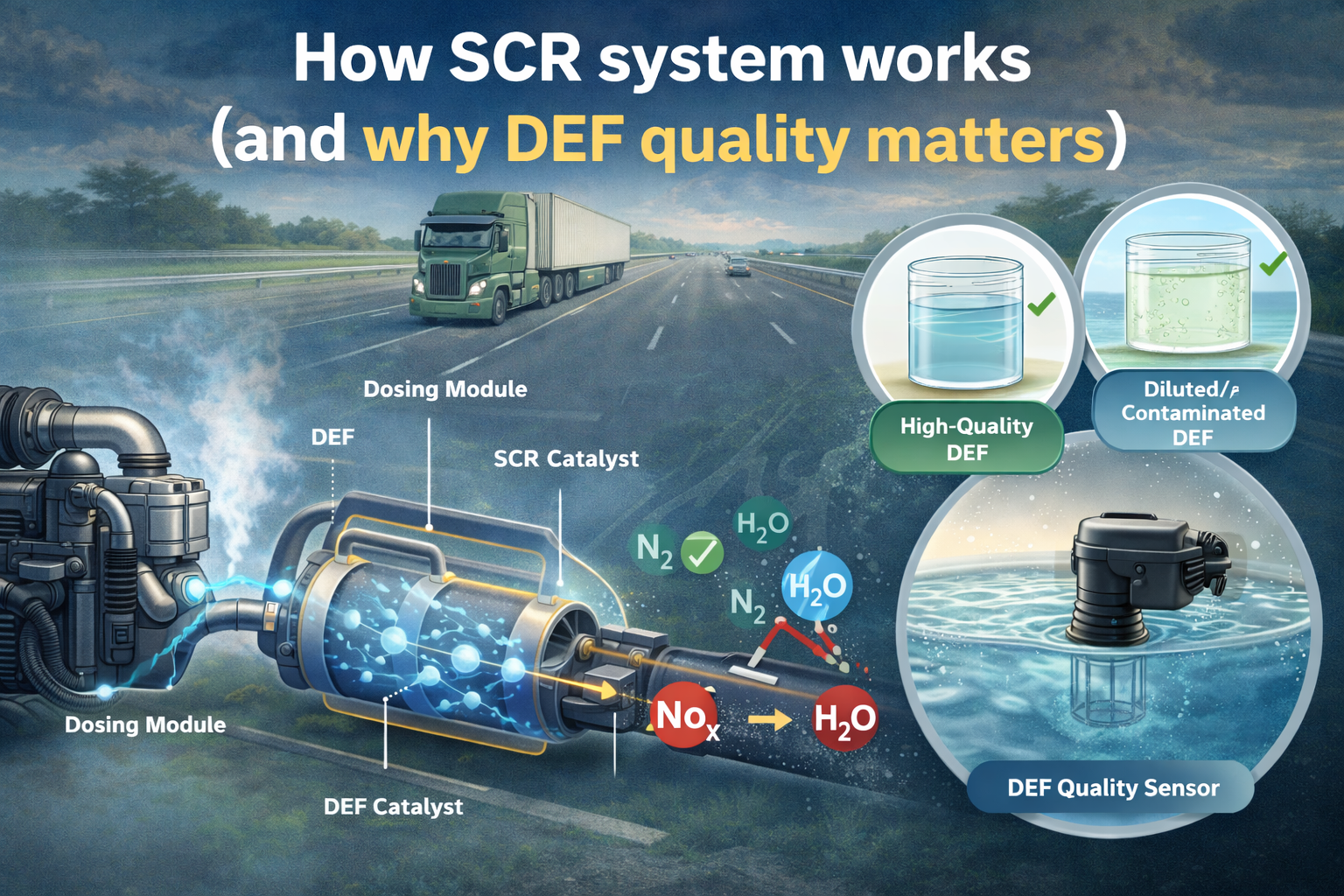
Modern diesel vehicles use Selective Catalytic Reduction (SCR) to cut NOx emissions (nitrogen oxides) in the exhaust. The core idea is simple:

  1. Exhaust leaves the engine carrying NOx.
  2. A dosing module injects DEF (Diesel Exhaust Fluid)—also called AdBlue in many markets—into the hot exhaust stream.
  3. DEF is an aqueous urea solution (nominally 32.5% urea in deionized water). In the exhaust, urea breaks down to form ammonia (NH₃).
  4. Inside the SCR catalyst, ammonia reacts with NOx and converts it into nitrogen (N₂) and water (H₂O).

If the system doses the right amount of DEF, at the right time, and the catalyst is healthy, NOx emissions drop dramatically.

Where the DEF quality sensor fits

The SCR controller assumes DEF has the correct urea concentration. If DEF is:

  • diluted with water,
  • contaminated, or
  • wrong fluid entirely,

then ammonia generation is off, dosing control becomes inaccurate, and NOx reduction suffers. That can lead to:

  • emissions non-compliance,
  • catalyst or dosing faults,
  • crystal deposits / clogging risks (from improper dosing and evaporation behaviour), and
  • repeated warning lamps / limp-home strategies.

So a DEF quality sensor is essentially an “input-truth” sensor: it verifies the fluid is what the ECU thinks it is, so the SCR system can function reliably across real-world usage.

Why DEF quality sensing is critical in BS6 vehicles

BS6 (Bharat Stage VI) tightened allowable emissions significantly, especially NOx for diesels, which pushed SCR adoption across many vehicle segments in India.

Regulations also require that emission control systems are not easily defeated or bypassed. In practice, that means vehicles must detect and respond to:

  • wrong / low-quality DEF,
  • empty tanks,
  • dosing malfunctions, and
  • emissions-control tampering.

Typical responses include warnings, inducements (e.g., reduced torque), and diagnostic trouble codes. That makes DEF quality sensing not just a performance feature but a compliance and durability necessity—because sustained NOx non-control can put the vehicle out of regulatory conformity.

Two main approaches to DEF quality sensing

Most DEF quality sensors aim to estimate urea concentration (and sometimes infer contamination) by measuring how the fluid interacts with light or sound. The two widely used families are:

  1. Optical sensing (often using refractive index / light transmission behavior)
  2. Ultrasonic sensing (using sound velocity / acoustic attenuation)

Both technologies exist because DEF is tricky:

  • It’s water-based, but not just water.
  • Concentration must be close to nominal for correct ammonia generation.
  • It can freeze, warm up, age, and pick up air bubbles or crystals.
  • The sensor sits in a harsh underbody environment: temperature cycling, vibration, contamination, chemical exposure, and connector issues.

How optical DEF quality sensing works

Principle (in simple terms)

Optical sensors shine light through or into the fluid and measure how it behaves—commonly through:

  • Refractive index (RI): how strongly the fluid bends light.
  • Transmission / absorption: how much light passes through at certain wavelengths.
  • Backscatter / reflection: how light reflects based on fluid properties.

Because urea concentration changes the optical properties of the solution, the sensor can estimate concentration when combined with temperature compensation.

Evolution: why optical became attractive

Optical methods matured fast due to:

  • Low-cost, robust LEDs and photodiodes
  • Better optical plastics, windows, and sealing methods
  • Compact opto-mechanical packaging suited to tank modules
  • Mature signal processing (filtering noise, compensating temperature and aging)

How it’s used in DEF quality sensing

A typical design has:

  • Light source (LED)
  • Optical path or prism/window contacting the DEF
  • Detector (photodiode)
  • Temperature sensor (very important)
  • Calibration curve mapping optical signal → concentration

How ultrasonic DEF quality sensing works

Principle (in simple terms)

Ultrasonic sensors send a high-frequency sound wave through the fluid and measure:

  • Speed of sound in the fluid (changes with concentration and temperature)
  • Attenuation (how quickly the sound weakens), which can also be influenced by bubbles and contamination
  • Sometimes time-of-flight and amplitude patterns

Because urea concentration changes density and compressibility, it changes the speed of sound—again requiring strong temperature compensation.

Evolution: why ultrasonic gained popularity

Ultrasonic sensing benefited from:

  • Better low-power piezo transducers
  • Improved timing electronics (precise time-of-flight measurement)
  • Automotive-grade digital processing
  • Strong packaging learning from ultrasonic parking sensors and flow meters

How it’s used in DEF quality sensing

A typical design has:

  • One or two ultrasonic transducers
  • A defined acoustic path length inside a chamber or across a sensor face
  • Electronics to measure time-of-flight and/or amplitude
  • Temperature sensor + calibration model

Advantages and limitations: Optical vs Ultrasonic

Optical sensing — advantages

  • High sensitivity to concentration changes (especially with refractive index methods)
  • Fast response
  • Can be compact with simple electronics
  • Often cost-effective at scale
  • Can be designed to be low power

Optical sensing — limitations

  • Window fouling / deposits: crystallization, films, or contamination on the optical surface can skew readings.
  • Aging of optics: LED output drift, photodiode sensitivity drift, yellowing of plastics over long life (depends on materials and design).
  • Bubbles / turbidity can disrupt the light path.
  • Needs good mechanical design to avoid false readings due to partial wetting, film formation, or trapped air.

Typical real-world failure modes: gradual signal drift due to optical path contamination, seal/window issues, connector ingress, or misreads during freeze/thaw transitions.

Read More: https://indicationinstruments.com/how-shingo-model-improves-product-quality-automotive-sensors/

Ultrasonic sensing — advantages

  • No “clear window” requirement in the same way as optical; can be less sensitive to surface staining.
  • Can be relatively robust to some forms of optical contamination/turbidity.
  • Speed of sound measurement can be very repeatable with good temperature compensation.
  • Can sometimes provide extra diagnostics (bubbles, aeration, fill state indicators) depending on implementation.

Ultrasonic sensing — limitations

  • Air bubbles are a big enemy: aeration can severely disturb ultrasonic transmission.
  • More sensitive to mechanical coupling and mounting: path length and alignment matter.
  • Electronics can be more complex (precise timing, signal conditioning).
  • DEF freezing and crystal formation can affect acoustic behavior near the sensor face.
  • In some designs, attenuation changes can be difficult to interpret uniquely (concentration vs bubbles vs contamination).

Typical real-world failure modes: intermittent readings from aeration, mounting stress, transducer aging, or edge-case errors during slosh/fill events and freeze/thaw.

Which technology is more preferred (especially considering warranty / failures)?

General industry tendency (practical view)

  • Optical can be excellent when the design strongly mitigates window fouling (good flow around the optical face, self-cleaning geometry, smart filtering/diagnostics). But if fouling is not controlled, optical drift leads to customer-visible issues (false poor quality, repeated warnings).
  • Ultrasonic avoids classic “dirty window” issues but is often more vulnerable to bubbles/aeration, which can be common during refills, return flow, and slosh—potentially causing intermittent faults if filtering and algorithms aren’t strong.

A practical recommendation for “warranty robustness”

  • If the vehicle duty cycle often includes frequent refills, slosh, and aeration, and the packaging cannot ensure stable fluid contact, optical may produce fewer intermittent faults (provided the optical surface is protected against deposits).
  • If the system historically struggles with crystal/deposit build-up at the sensor face or the tank environment is prone to contamination films, ultrasonic may be preferred due to reduced dependence on optical clarity—as long as the design handles bubbles well.

Best-practice design notes (what reduces failures for both)

Regardless of technology, the best warranty outcomes usually come from:

  • Strong temperature measurement and compensation (DEF properties vary heavily with temperature)
  • Freeze/thaw-aware algorithms (ignore readings during transition, confirm stability)
  • Debounced diagnostics (avoid triggering faults on short-term disturbances)
  • Mechanical design that ensures consistent wetting and minimizes trapped air
  • Service-friendly diagnostics (differentiate “bad DEF” vs “sensor issue” vs “aeration event”)

Closing: what the future looks like

As BS6 (and global) emission enforcement strengthens, DEF quality sensing is moving toward:

  • better multi-parameter sensing (concentration + contamination heuristics),
  • smarter diagnostics to reduce false warnings,
  • improved materials to fight deposits and long-term drift,
  • and designs that remain stable across harsh real-world conditions.

Optical and ultrasonic sensing are both proven. The “winner” is usually the one that best matches the tank hydraulics, packaging constraints, and diagnostic philosophy—not just the physics.

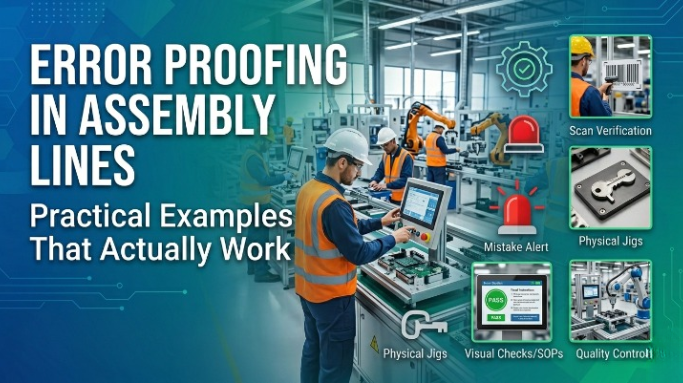
Error Proofing in Assembly Lines: Practical Examples That Actually Work

Error Proofing in Assembly Lines: Practical Examples That Actually Work

Error Proofing in Assembly Lines: Practical Examples That Actually Work

How Error-Proofing Slowly Removes the Need for Inspection?

In most factories, quality still depends heavily on inspection. We inspect incoming parts, inspect after every critical operation, inspect at the end of the line, and sometimes even inspect again before dispatch. On paper, this feels safe. In reality, it usually means the process itself is not fully trusted.

Automation was supposed to solve this problem. But in many automated lines, manufacturing Gauges, Instrument Clusters, and Digital Display systems inspection remains almost the same as before—just faster and more expensive. The real improvement in quality does not come from adding more inspection points. It comes from error-proofing the process so that mistakes simply cannot happen.

This blog talks about error-proofing in automated lines the way it is actually used on the shop floor, not the way it appears in presentations. These are practical examples that work, and more importantly, they explain why good error-proofing naturally reduces dependence on inspection.

Inspection exists because we expect something to go wrong. If the process were truly reliable, inspection would be minimal. But over time, inspection becomes a habit. When a defect occurs, the first reaction is often, “Add one more check.”

The problem with this approach is simple:

  • Inspection finds defects after they are already made
  • It depends on human attention and judgment
  • It slows down the line
  • It hides weak processes instead of fixing them

Anyone who has worked on the shop floor knows that even 100% inspection does not guarantee zero defects. Fatigue, pressure, and routine make mistakes inevitable.

Error-proofing takes a different approach. Instead of asking people to “be careful,” it changes the process so that being careless is no longer possible.

What Error-Proofing Really Means in Automation

Error-proofing in automated lines does not mean installing expensive vision systems everywhere. It means thinking ahead and asking one simple question at every step:

“How can this operation go wrong—and how can I stop it before it happens?”

Sometimes the solution is electronic. Sometimes it is mechanical. Often, it is just good logic in the PLC.

The best error-proofing solutions are usually:

  • Simple
  • Reliable
  • Hard to bypass
  • Easy to maintain

Also Read: Problem-solving that actually sticks: Practical techniques and why 8D works for us

Practical Error-Proofing Examples from Automated Lines

1. Part Presence and Orientation Checks

One of the most common causes of defects is wrong part loading or incorrect orientation. 

This is especially common in assembly of Gauges and Digital Display units, where alignment and connector placement must be perfect Operators may be trained, but in high-volume production, mistakes happen.

A simple sensor or vision check before cycle start can confirm:

  • Part is present
  • Part is in the correct position
  • Part is seated properly

If the condition is not met, the machine simply does not start.

This immediately removes the need for an operator or inspector to visually confirm the part. The machine takes responsibility, and the operator only responds if there is an alarm.

2. Forcing the Right Sequence

In manual or semi-automatic lines, operators sometimes skip steps—usually to save time, sometimes by mistake.

In a well error-proofed automated line, the sequence is locked. The next step is enabled only when the previous step is completed correctly and confirmed by a sensor or signal.

This means:

  • No step can be skipped
  • No step can be done twice
  • No step can be done out of order

Once this is in place, inspection for “missed operations” becomes unnecessary because the process itself guarantees completion.

3. Torque and Force Monitoring

Fastening and press-fit operations are sensitive and often responsible for major quality issues.

Instead of checking torque or fitment later, modern automated lines monitor:

  • Applied torque
  • Angle
  • Press force
  • Final position

If the values are outside limits, the system immediately flags the issue or stops the process.

This is far more reliable than checking bolts or fitment afterward. Numbers don’t lie, and machines don’t “feel” differently at the end of a long shift.

4. Position and Height Verification

Many defects happen because something is almost right, but not fully correct. A component looks fitted, but it is not seated fully.

Using simple height sensors, encoders, or probes, the machine can confirm:

  • Final height
  • Insertion depth
  • End position

Once this is validated automatically, there is no need for visual inspection at that station. The machine already knows whether the operation was successful.

5. Fixture and Clamp Interlocks

Running a machine without proper clamping or with a wrong fixture can damage parts, tools, or even cause safety incidents.

Limit switches and proximity sensors can confirm:

  • Fixture is present
  • Clamp is fully closed
  • Tool is correctly mounted

If any condition is not satisfied, the machine refuses to run. This eliminates reliance on operator attention and removes the need for pre-operation inspection.

6. Variant and Model Control

In multi-variant production, part mix-ups are a major risk. This is critical for products like Instrument Clusters and Digital Display models, where different variants require different configurations, Training alone is never enough.

Barcode or RFID systems allow the machine to verify:

  • Correct part number
  • Correct model
  • Correct program loaded

If there is a mismatch, the line stops immediately. This makes inspection for variant correctness almost irrelevant because the process itself blocks errors.

7. Rejecting Defects Immediately

One of the biggest weaknesses in many lines is allowing defects to move forward.

Effective error-proofing ensures that:

  • A defective part is rejected immediately
  • It cannot move to the next station
  • It cannot be mixed with OK parts

When defects are stopped at the source, end-of-line inspection and sorting reduce drastically.

How Error-Proofing Slowly Removes the Need for Inspection?

When error-proofing is done properly, something interesting happens over time. Inspection levels start reducing naturally.

This happens because:

  • The process becomes predictable
  • Defects stop repeating
  • Confidence in the line increases
  • Quality becomes stable, not reactive

Inspection then changes its role. Instead of checking every part, quality teams focus on:

  • Process audits
  • Trend analysis
  • Continuous improvement

Inspection becomes a confirmation, not a rescue activity.

Common Mistakes That We All Make

Many error-proofing attempts fail because:

  • Systems are over-engineered
  • Bypasses are easily available
  • Alarms are ignored
  • Maintenance is not involved
  • Detection is mistaken for prevention

True error-proofing does not just raise an alarm. It prevents the mistake from going further.

The Role of Process Engineers

Error-proofing is not the responsibility of machine suppliers alone. Process engineers play a key role by:

  • Studying past defects
  • Identifying weak steps
  • Converting inspection points into prevention points
  • Driving small but effective upgrades

Even one good error-proofing improvement every month can completely change the stability of a line.

Final Thoughts

Inspection will never disappear completely—and it shouldn’t. But when inspection becomes the main quality control method, it is a sign that the process needs improvement.

Error-proofing strengthens the process so that quality is built in, not checked in.

The best automated lines are not the ones with the most inspectors. They are the ones where nothing can go wrong unless something abnormal happens—and when it does, the system reacts immediately.

In the end, the strongest quality system is not the one that catches every defect, but the one that doesn’t allow defects to exist at all. Error-proofing is increasingly important in industries producing Gauges, Instrument Clusters, and Digital Display products, where reliability and accuracy are essential.

Frequently Asked Questions (FAQ)

Is error-proofing suitable only for fully automated assembly lines?

No. Error-proofing works in manual, semi-automatic, and fully automated lines. Simple solutions like interlocks, sensors, and sequence checks are often more effective than complex automation.

Can error-proofing completely eliminate inspection?

No. Inspection cannot be removed completely, but effective error-proofing greatly reduces the need for frequent and repetitive inspections by preventing defects at the source.

Is error-proofing expensive to implement?

Not necessarily. Many effective error-proofing solutions use simple sensors, mechanical guides, or PLC logic. These are often far cheaper than ongoing inspection, rework, and scrap costs.

How do you decide where to apply error-proofing first?

Start with processes that have repeated defects, high rework, or safety risks. Past quality data and operator feedback are the best inputs for identifying error-proofing opportunities.


Problem-solving that actually sticks: practical techniques and why 8D works for us

Problem-solving that actually sticks: practical techniques and why 8D works for us

Why Electronic Pressure Sensors Are Superior to Electromechanical Pressure Sensors
Everyone face problems in their work or in daily real life. Problem solving depends on how we handle i.e. understand of actual problem and how we proceed for detailed analysis.
Patchwork fixes temporarily while Disciplined problem solving fixes causes. There are many problem solving techniques being used in automotive sector for products like digital instrument panel, instrument cluster digital, and electronic dashboard instruments like : PDCA, DMAIC, 5-Whys, Fishbone diagrams, FMEA and — the one we use extensively use— the 8D (Eight Disciplines) methodology.
Below we’ll walk through these techniques briefly and then review 8D in details i.e.how we use it day-to-day.

Brief details of problem-solving techniques

  • PDCA (Plan–Do–Check–Act) — This is iterative loop. Great for small experiments and continuous improvements.
  • DMAIC (Define–Measure–Analyze–Improve–Control) — This is backbone of Six Sigma. Use this when the problem needs statistical analysis and tight controls.
  • 5-Whys — Ask why regularly (at least 5 times) until you reach to actual root cause of problem.
  • Fishbone (Ishikawa) diagrams — This include all possible causes for problem including Man, Machine,Material, Method and Measurement. Great for team brainstorming and make sure you don’t miss important angles.
  • FMEA (Failure Modes & Effects Analysis) — a preventive, Potential risk-based technique to score risks and plan mitigations, typically used during design or process changes.

All of these techniques are useful. When an issue is cross-functional, impact customer, or requires both immediate containment and long-term fixes, the 8D method is often the most practical and reliable choice. This is especially true in complex assemblies such as electronic dashboard instruments and digital instrument panel systems.

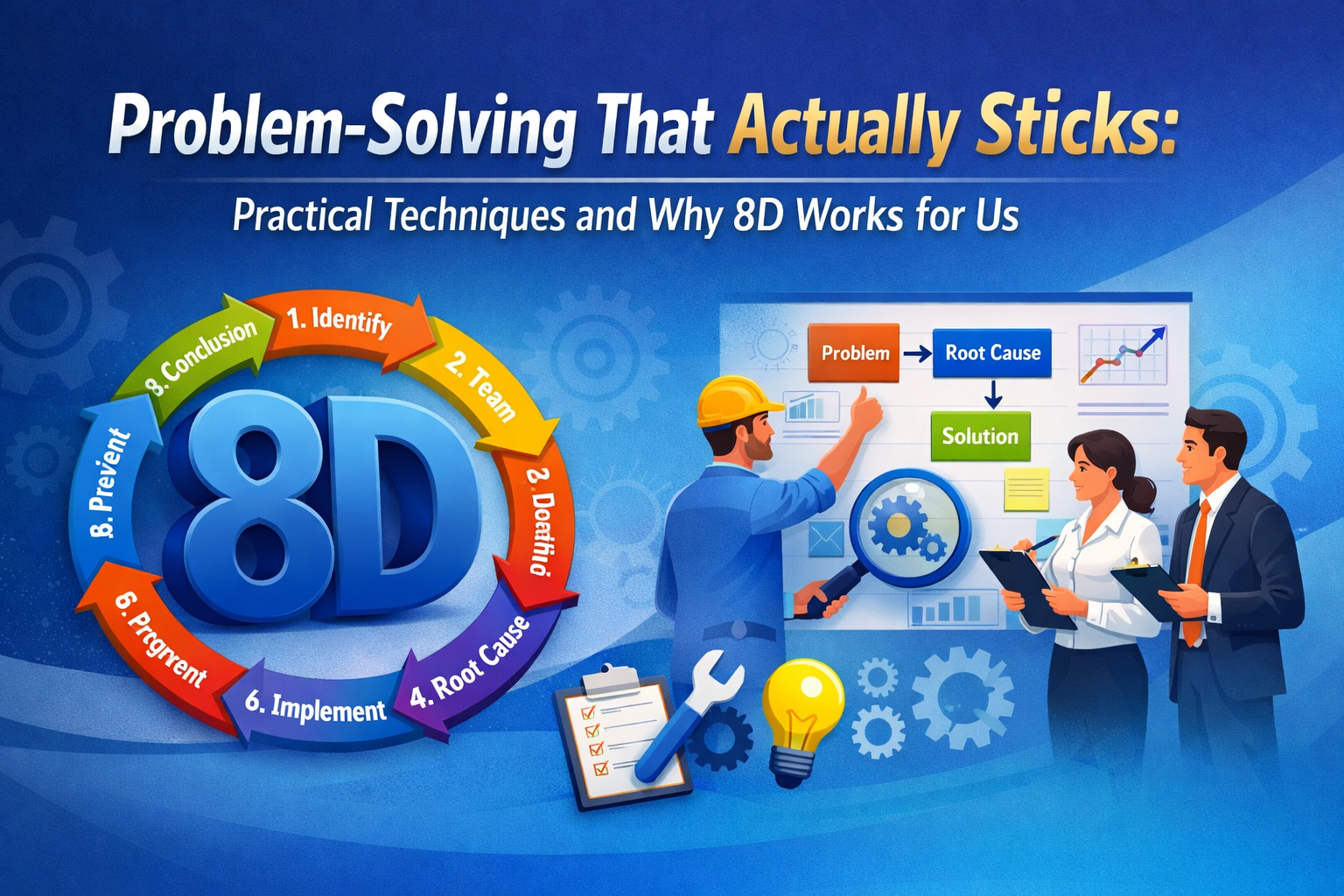
What is 8D?

8D stands for Eight Disciplines. It’s a structured, team-based approach designed to solve complex problems and ensure they don’t recur.

  • D1 — Define the problem (4W/1H)
  • D2 — Form Team
  • D3 — Implement Interim Containment Actions
  • D4 — Root cause Analysis (5 why)
  • D5 — Select and implement Permanent Corrective Actions
  • D6 — Implement Preventive Actions
  • D7 — Confirm the effectiveness & Horizontal Deployment
  • D8 — Congratulate & Close

Two things make 8D powerful: early containment to protect customers and operations, and a disciplined progression from root-cause analysis through verified implementation and systemic prevention.

How we actually use 8D

D1: Define the problem (4W/1H)

A precise problem statement makes the investigation efficient. Replace vague descriptions like “For example, instead of saying ‘display not working,’ specify ‘backlight failure in instrument cluster digital during end-of-line testing” with specific statements: (Quote: “A problem is half solved if defined well.”)

What is actual problem?
Where is problem found?
When Problem Occurred?
Who reported problem?
How much Qty of failed part?

Define all aspects with relevant data evidence.

Note: Never ask ‘Why’ during define the problem.

Evaluate Severity of problem will help in prioritization.

D2: Form Team

8D is a CFT activity. A good 8D team includes all relevant cross function members like Process quality, Production, Supplier Quality, Engineering etc.Assign a clear team leader and capture member roles up front. That role clarity reduces confusion and speeds decisions during the investigation.

Why it matters? diverse perspectives catch blind spots, and having a named leader means actions get tracked and completed.

D3: Implement Interim Containment Actions

Containment buys you time to investigate. Actions include re inspection of stock available at customer site/Transit/ plant, quarantining suspect lots, stopping shipments, adding inspection steps. This is often required when issues occur in customer-critical parts like digital instrument panel or electronic dashboard instruments.

Record containment actions and results so you can later evaluate whether they were sufficient and when they can be withdrawn.

Doing GEMBA audit is also part of containment action.

D4: Root cause Analysis (5 why)

This is section where fishbone diagrams, 5-Whys start. Brainstorm systematically using Fishbone to cover all possible causes. Use 5-Whys to drill into the most likely branches.

In IIL we do root cause analysis for following area

  1. For occurrence
  2. For Non Detection
  3. System root cause

Main aspect of root cause analysis is that we need to validate the cause which determined by analysis i.e. ‘Root cause verification’

Root cause Verification can be done by physical witness of determined event or cause or by simulation of problem by determined cause.

It’s always a typical task to replicate the actual problem in same fashioned since multiple field factors are unknown.

Our prime focus is on root cause verification.
Related Blog : https://indicationinstruments.com/robotic-pointer-fitment-in-instrument-clusters/

D5: Select and implement Permanent Corrective Actions

Generate potential corrective actions for occurrence, non detection & system root cause fixing. Then validate them experimentally. A verified corrective action is demonstrated to fix the problem without introducing new issues. Define acceptance criteria and run controlled trials.

Note: Corrective actions should be in linkage with determined root cause.

D6: Implement Preventive Actions

During analysis we thoroughly study the process, part, design etc and take preventive action for potential risk/problem as a proactive approach.

Note: During implementation of permanent corrective actions/preventive actions. Update work instruction, control plan, FMEA etc. Assign responsibility and timelines for all action points with target date , track them for ontime implementation.

Verify the corrective actions status on regular interval to ensure all are in place.

D7: Confirm the effectiveness & Horizontal Deployment

Its always important to monitor the effectiveness of corrective action in future rejection returns trends/ quality concerns. This evident how much our corrective actions effective.

Deploy the actions horizontally where applicable in same family or similar design products.

D8: Congratulate & Close

Formally close the 8D after a period of monitoring and documented confirmation that targets were achieved.

Capture lessons learnt and celebrate the team.